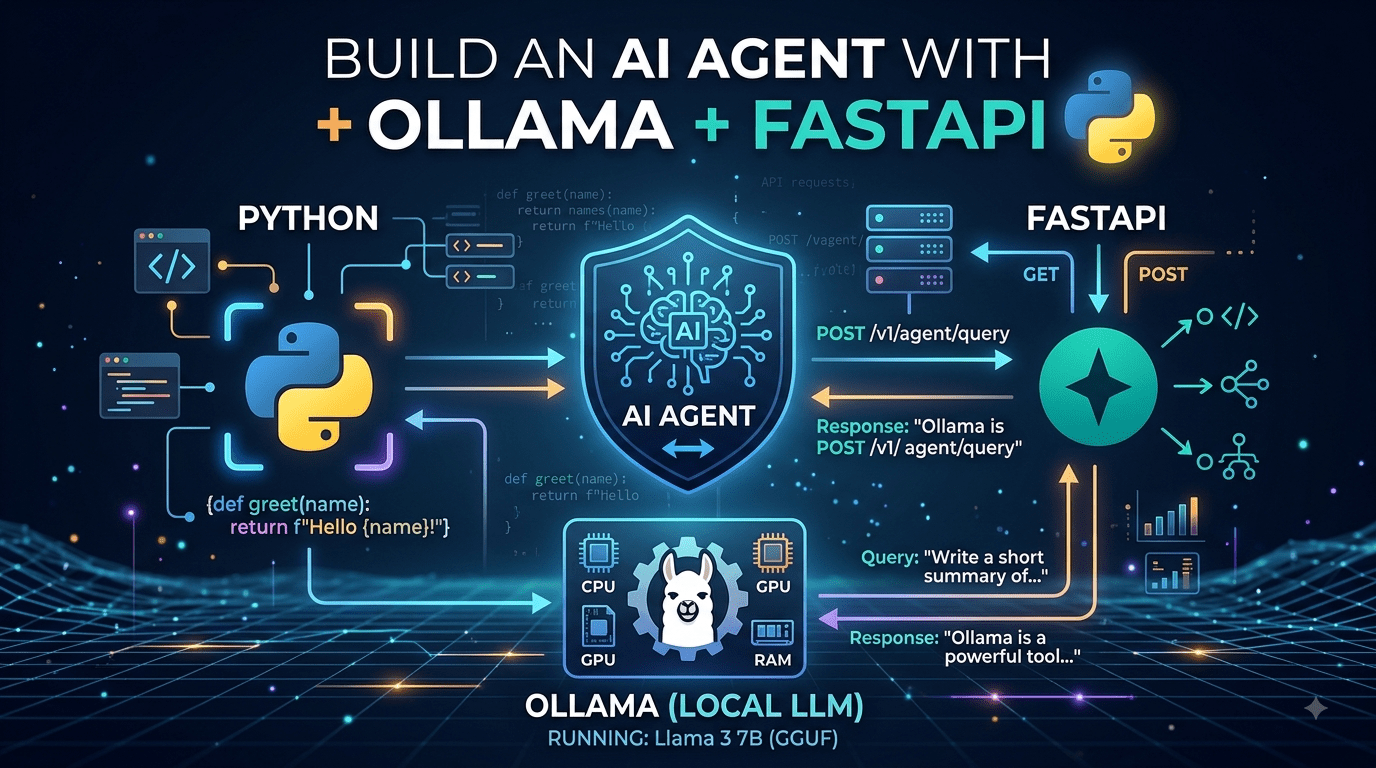

AI agents are the next evolution beyond simple chatbots. An agent doesn’t just answer questions – it decides what to do, calls tools, and reasons through multi-step problems. The best part? You can build one entirely on your own machine, no cloud APIs or subscription fees required.
In this post, we’ll build a fully functional AI agent using three open-source technologies:
- Ollama – run LLMs locally (Llama 3, Mistral, etc.)
- FastAPI – expose the agent as a REST API
- Python – glue everything together with tool-calling logic
By the end, you’ll have an agent that can answer questions, perform web searches, run shell commands, and remember your conversation – all from a curl command.
Table of Contents
- Architecture Overview
- Prerequisites
- Project Setup
- The Core Agent
- Adding Tools
- Conversation Memory
- The FastAPI Layer
- Running the Agent
- Production Considerations
- Conclusion
Architecture Overview
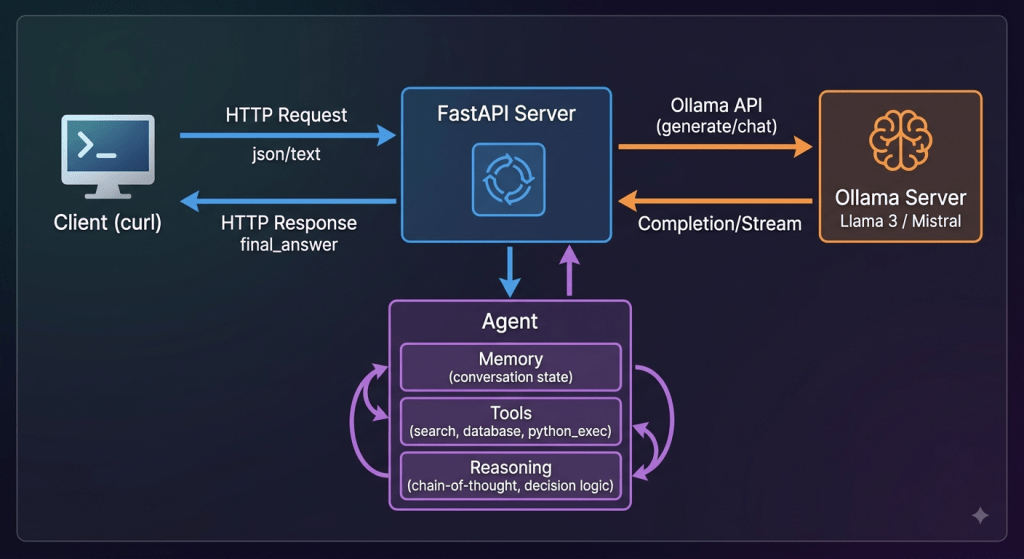
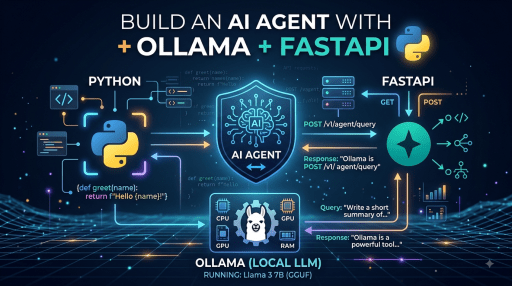
The agent works in a loop:
- Client sends a message via REST API.
- FastAPI forwards it to the agent.
- The agent sends the conversation to Ollama.
- Ollama returns either a final answer or a tool-call request.
- If tool called, the agent executes it and feeds results back into Ollama.
- Repeat until a final answer is produced.
Prerequisites
Install Ollama and pull a model:
curl -fsSL https://ollama.com/install.sh | sh
ollama pull llama3.2
Create a Python virtual environment:
python3 -m venv venv
source venv/bin/activate
pip install fastapi uvicorn httpx pydantic
Project Setup
Here’s the directory layout:
agent/
├── main.py          # FastAPI app entry point
├── requirements.txt
├── agent/
│   ├── __init__.py
│   ├── core.py      # Agent loop and reasoning
│   ├── tools.py     # Tool definitions and registry
│   └── memory.py    # Conversation memory
The Core Agent
The agent’s job is to manage the conversation loop: send messages to Ollama, check if a tool call is needed, run the tool, and feed the result back until a final answer emerges.
Create agent/core.py:
from __future__ import annotations
import json
from dataclasses import dataclass, field
import httpx
from agent.tools import ToolRegistry
from agent.memory import ConversationMemory, Message
@dataclass
class Agent:
    """Core agent that orchestrates LLM reasoning and tool execution."""
    model: str = "llama3.2"
    ollama_url: str = "http://localhost:11434"
    memory: ConversationMemory = field(default_factory=ConversationMemory)
    tools: ToolRegistry = field(default_factory=ToolRegistry)
    max_iterations: int = 10
    async def run(self, user_input: str) -> str:
        """Run the agent loop for a single user message."""
        self.memory.add(Message(role="user", content=user_input))
        for _ in range(self.max_iterations):
            response = await self._call_ollama()
            if response.get("message", {}).get("tool_calls"):
                await self._handle_tool_calls(response["message"]["tool_calls"])
            else:
                content: str = response.get("message", {}).get("content", "")
                self.memory.add(Message(role="assistant", content=content))
                return content
        return "Agent reached maximum iterations without a final answer."
    async def _call_ollama(self) -> dict[str, object]:
        """Send conversation to Ollama and return the raw response."""
        payload: dict[str, object] = {
            "model": self.model,
            "messages": self.memory.to_api_format(),
            "stream": False,
        }
        if self.tools:
            payload["tools"] = self.tools.to_api_format()
        async with httpx.AsyncClient(timeout=120) as client:
            resp = await client.post(
                f"{self.ollama_url}/api/chat",
                json=payload,
            )
            resp.raise_for_status()
        return resp.json()  # type: ignore[no-any-return]
    async def _handle_tool_calls(
        self, tool_calls: list[dict[str, object]]
    ) -> None:
        """Execute tool calls and add results back to memory."""
        self.memory.add(
            Message(
                role="assistant",
                content="",
                tool_calls=tool_calls,
            )
        )
        for call in tool_calls:
            func = call.get("function", {})
            name: str = str(func.get("name", ""))
            args: dict[str, object] = func.get("arguments", {})
            if isinstance(args, str):
                args = json.loads(args)
            result = await self.tools.execute(name, **args)
            self.memory.add(
                Message(
                    role="tool",
                    content=str(result),
                    name=name,
                    tool_call_id=str(call.get("id", "")),
                )
            )
    def reset(self) -> None:
        """Clear conversation memory."""
        self.memory.clear()
Adding Tools
Tools give the agent the ability to act. Each tool is a Python function with a schema that Ollama understands.
Create agent/tools.py:
from __future__ import annotations
import subprocess
from dataclasses import dataclass, field
from typing import Any
import httpx
@dataclass
class Tool:
    """A callable tool with a JSON schema for LLM function calling."""
    name: str
    description: str
    parameters: dict[str, object]
    handler: Any  # async callable
    def to_api_format(self) -> dict[str, object]:
        return {
            "type": "function",
            "function": {
                "name": self.name,
                "description": self.description,
                "parameters": self.parameters,
            },
        }
@dataclass
class ToolRegistry:
    """Manages a collection of tools the agent can invoke."""
    _tools: dict[str, Tool] = field(default_factory=dict)
    def register(self, tool: Tool) -> None:
        self._tools[tool.name] = tool
    def to_api_format(self) -> list[dict[str, object]]:
        return [t.to_api_format() for t in self._tools.values()]
    async def execute(self, name: str, **kwargs: object) -> str:
        tool = self._tools.get(name)
        if not tool:
            return f"Error: tool '{name}' not found."
        try:
            result = await tool.handler(**kwargs)
            return str(result)
        except Exception as exc:
            return f"Tool error: {exc}"
    def __bool__(self) -> bool:
        return bool(self._tools)
# ── Built-in tools ────────────────────────────────────────────
async def _run_shell(command: str) -> str:
    """Execute a shell command and return stdout + stderr."""
    proc = subprocess.run(
        command, shell=True, capture_output=True, text=True, timeout=30
    )
    return proc.stdout.strip() or proc.stderr.strip() or "(no output)"
async def _web_search(query: str) -> str:
    """Perform a DuckDuckGo instant answer search."""
    async with httpx.AsyncClient(timeout=15) as client:
        resp = await client.get(
            "https://api.duckduckgo.com/",
            params={"q": query, "format": "json", "no_html": "1"},
        )
        resp.raise_for_status()
        data = resp.json()
        abstract: str = data.get("AbstractText", "")
        if abstract:
            return abstract
        related = data.get("RelatedTopics", [])
        if related:
            return related[0].get("Text", "No results.")
        return "No relevant results found."
async def _get_current_time() -> str:
    """Return the current UTC time in ISO format."""
    from datetime import datetime, timezone
    return datetime.now(timezone.utc).isoformat()
def create_default_tools() -> ToolRegistry:
    """Return a registry preloaded with built-in tools."""
    registry = ToolRegistry()
    registry.register(
        Tool(
            name="run_shell",
            description="Run a shell command on the local machine. Use for file operations, system info, etc.",
            parameters={
                "type": "object",
                "properties": {
                    "command": {
                        "type": "string",
                        "description": "The shell command to execute.",
                    },
                },
                "required": ["command"],
            },
            handler=_run_shell,
        )
    )
    registry.register(
        Tool(
            name="web_search",
            description="Search the web via DuckDuckGo and return a summary.",
            parameters={
                "type": "object",
                "properties": {
                    "query": {
                        "type": "string",
                        "description": "The search query.",
                    },
                },
                "required": ["query"],
            },
            handler=_web_search,
        )
    )
    registry.register(
        Tool(
            name="get_current_time",
            description="Return the current date and time in UTC.",
            parameters={
                "type": "object",
                "properties": {},
                "required": [],
            },
            handler=_get_current_time,
        )
    )
    return registry
Conversation Memory
The agent needs to remember the full conversation thread to maintain context. Create agent/memory.py:
from __future__ import annotations
from dataclasses import dataclass, field
@dataclass
class Message:
    """A single message in a conversation."""
    role: str  # "user", "assistant", "tool"
    content: str
    name: str | None = None
    tool_call_id: str | None = None
    tool_calls: list[dict[str, object]] | None = None
    def to_api_format(self) -> dict[str, object]:
        msg: dict[str, object] = {"role": self.role, "content": self.content}
        if self.name:
            msg["name"] = self.name
        if self.tool_call_id:
            msg["tool_call_id"] = self.tool_call_id
        if self.tool_calls:
            msg["tool_calls"] = self.tool_calls
        return msg
@dataclass
class ConversationMemory:
    """Stores the full conversation history."""
    messages: list[Message] = field(default_factory=list)
    def add(self, message: Message) -> None:
        self.messages.append(message)
    def to_api_format(self) -> list[dict[str, object]]:
        return [m.to_api_format() for m in self.messages]
    def clear(self) -> None:
        self.messages.clear()
    def __len__(self) -> int:
        return len(self.messages)
The FastAPI Layer
Now wrap the agent in a REST API. Create main.py:
from __future__ import annotations
from contextlib import asynccontextmanager
from fastapi import FastAPI
from pydantic import BaseModel
from agent.core import Agent
from agent.tools import create_default_tools
class ChatRequest(BaseModel):
    message: str
class ChatResponse(BaseModel):
    reply: str
agent: Agent = Agent()
@asynccontextmanager
async def lifespan(app: FastAPI):
    """Startup: register default tools."""
    agent.tools = create_default_tools()
    yield
    # Shutdown: nothing special needed
app = FastAPI(title="AI Agent API", lifespan=lifespan)
@app.get("/health")
async def health() -> dict[str, str]:
    return {"status": "ok"}
@app.post("/chat", response_model=ChatResponse)
async def chat(req: ChatRequest) -> ChatResponse:
    reply = await agent.run(req.message)
    return ChatResponse(reply=reply)
@app.post("/chat/reset")
async def reset_chat() -> dict[str, str]:
    agent.reset()
    return {"status": "reset"}
if __name__ == "__main__":
    import uvicorn
    uvicorn.run("main:app", host="0.0.0.0", port=8000, reload=True)
Running the Agent
Make sure Ollama is running, then start the API:
# Terminal 1: Start Ollama
ollama serve
# Terminal 2: Start the agent API
cd agent
pip install -r requirements.txt
python main.py
Test it with curl:
# Simple question
curl -X POST http://localhost:8000/chat \
  -H "Content-Type: application/json" \
  -d '{"message": "What time is it right now?"}'
# Tool-using question
curl -X POST http://localhost:8000/chat \
  -H "Content-Type: application/json" \
  -d '{"message": "Search the web for the latest news about Python 3.14"}'
# Shell command
curl -X POST http://localhost:8000/chat \
  -H "Content-Type: application/json" \
  -d '{"message": "List the files in the current directory"}'
# Reset conversation
curl -X POST http://localhost:8000/chat/reset
Sample response:
{"reply": "The current UTC time is 2026-08-11T09:24:00.123456+00:00."}Production Considerations
Security. The run_shell tool can execute arbitrary commands. In production, you’ll want to sandbox it with Docker, restrict available commands, or disable it entirely and rely only on safe tools like web_search.
Rate limiting. Add a rate limiter (e.g., slowapi) to prevent abuse:
from slowapi import Limiter
from slowapi.util import get_remote_address
limiter = Limiter(key_func=get_remote_address)
app.state.limiter = limiter
@app.post("/chat")
@limiter.limit("10/minute")
async def chat(req: ChatRequest) -> ChatResponse:
    ...
Streaming. Ollama supports token-by-token streaming. You can change "stream": False to "stream": True and use resp.aiter_lines() + Server-Sent Events in FastAPI to stream responses in real time.
Persistent memory. The current memory lives only in process memory. For multi-user or long-lived conversations, swap ConversationMemory for a database-backed store (SQLite, Redis, Postgres).
Model choice. While llama3.2 is fast-lane-friendly, models like llama3.1:8b, mistral, or qwen2.5 offer stronger tool-calling abilities. Experiment to find the right balance for your use case.
Conclusion
In about 200 lines of Python, we built a fully local AI agent that:
- Talks to an LLM via Ollama
- Calls tools (shell, web search, time)
- Maintains conversation memory
- Exposes everything through a REST API
This is just the starting line. From here you can add custom tools for your domain – database queries, Jira integration, code execution, Slack notifications – and turn this into a real productivity copilot, all running on your own hardware.