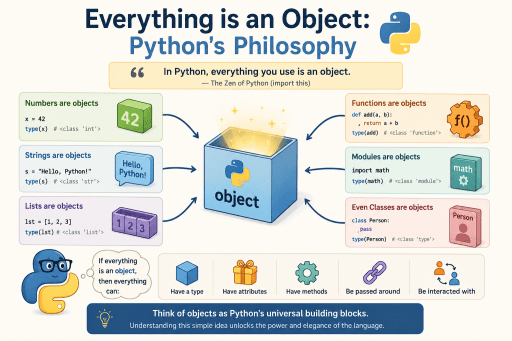
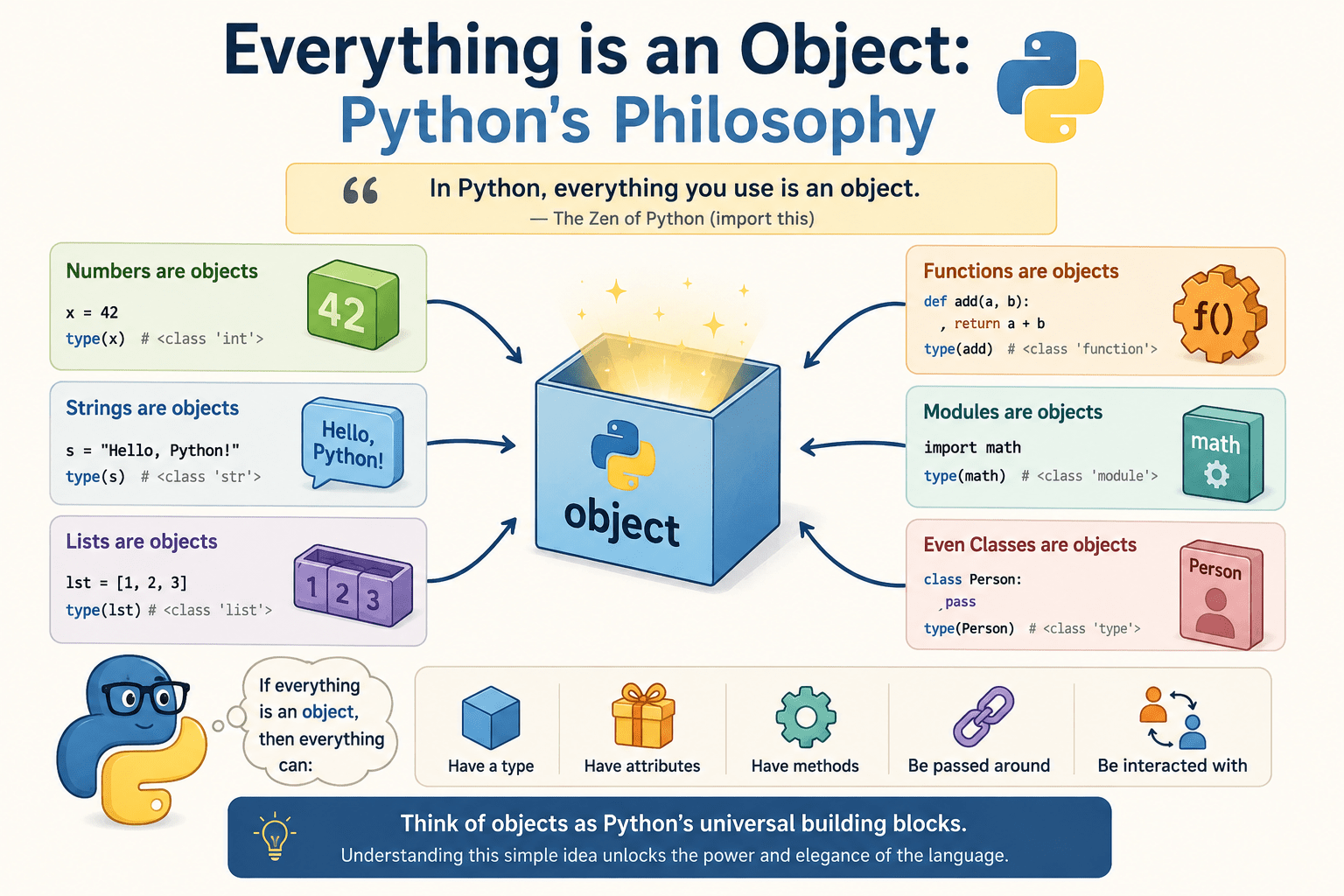

If you have spent any time learning Python, you may have heard experienced developers say something that sounds almost philosophical: “In Python, everything is an object.” At first, this statement might seem like an abstract piece of trivia, something you nod along to without fully grasping its implications. But as you dig deeper into the language, you begin to realize that this single concept is not just a design choice — it is the very foundation upon which Python’s elegance, flexibility, and power are built.
Whether you are a complete beginner just starting your programming journey, an intermediate developer trying to level up your skills, or an experienced engineer looking to understand Python more deeply, this guide will take you on a comprehensive tour of what it truly means for everything to be an object in Python. By the end of this article, you will look at Python code through a completely different lens.
Let us dive in.
Table of Contents
- What Does “Everything Is an Object” Actually Mean?
- A Brief History: Why Python Was Designed This Way
- Understanding Objects: The Core Concepts
- Primitive Types? Not in Python
- Functions Are Objects Too
- Classes Are Objects
- Modules Are Objects
- None, True, and False Are Objects
- The
id(),type(), andisinstance()Functions: Your Object Inspection Toolkit - The Object Model Under the Hood: CPython and PyObject
- First-Class Objects and Why They Matter
- Practical Implications for Python Programmers
- Common Pitfalls and Misconceptions
- Real-World Examples: Leveraging Python’s Object Model
- Frequently Asked Questions
- Conclusion
1. What Does “Everything Is an Object” Actually Mean?
When we say that everything in Python is an object, we mean this in the most literal and comprehensive sense possible. Every single value you work with in Python — every number, string, list, function, class, module, and even None — is an instance of some class. There are no primitive data types in the way that languages like Java or C++ have them.
In Java, for example, you have a distinction between primitive types such as int, float, boolean, and char, and their object counterparts like Integer, Float, Boolean, and Character. Python makes no such distinction. Everything lives in the same unified object hierarchy.
A Simple Demonstration
# Let's check the type of various "things" in Python

print(type(42))          # <class 'int'>
print(type(3.14))        # <class 'float'>
print(type("hello"))     # <class 'str'>
print(type([1, 2, 3]))   # <class 'list'>
print(type(True))        # <class 'bool'>
print(type(None))        # <class 'NoneType'>

# Even functions are objects
def greet():
    pass

print(type(greet))       # <class 'function'>

# Even classes are objects
class MyClass:
    pass

print(type(MyClass))     # <class 'type'>
Every single call to type() returns a class. This means every value has a class — and having a class means being an object. This consistency is intentional, and it has profound consequences for how Python code is written and how the language itself behaves.
2. A Brief History: Why Python Was Designed This Way
To understand why Python works the way it does, it helps to understand the vision of its creator, Guido van Rossum, who began developing Python in the late 1980s and released the first version in 1991.
Van Rossum was inspired by several languages, most notably ABC, a language designed for teaching programming, and Modula-3. He wanted Python to be a language that was:
- Easy to read and write, with clean, English-like syntax
- Highly consistent, so that programmers could make educated guesses about how new features worked
- Expressive, allowing developers to do more with less code
One of the ways he achieved this consistency was by making the object model uniform. Rather than having special-case rules for different kinds of data, Python treats everything the same way. This uniformity means that the rules you learn for one part of the language apply everywhere else.
The Influence of Smalltalk
Python’s object model is heavily influenced by Smalltalk, one of the earliest and most influential object-oriented programming languages. Smalltalk pioneered the concept that everything — including numbers, booleans, and even classes — should be objects. Python embraced this philosophy wholeheartedly.
Python 2 vs Python 3: Completing the Journey
Interestingly, Python’s “everything is an object” philosophy was not fully realized until Python 3. In Python 2, there was a distinction between “old-style” classes (which did not inherit from object) and “new-style” classes (which did). In Python 3, all classes automatically inherit from object, completing the unified object hierarchy.
# In Python 3, every class implicitly inherits from object
class MyClass:
    pass

print(isinstance(MyClass(), object))  # True
print(issubclass(MyClass, object))    # True
3. Understanding Objects: The Core Concepts
Before we explore how everything in Python is an object, let us establish a solid understanding of what an object actually is.
What Is an Object?
An object is a self-contained unit that combines:
- State (data/attributes): The information the object holds
- Behavior (methods): The actions the object can perform
- Identity: A unique identifier that distinguishes it from all other objects
In Python, every object has these three characteristics, and Python provides built-in tools to inspect each of them.
Identity: The id() Function
Every object in Python has a unique identity, which is essentially its memory address. You can access it using the id() function.
x = 42
y = "hello"
z = [1, 2, 3]

print(id(x))  # e.g., 140234567890
print(id(y))  # e.g., 140234567900
print(id(z))  # e.g., 140234567910
Two objects can never have the same identity at the same time. However, after an object is deleted and its memory is freed, a new object might reuse that address.
Type: The type() Function
Every object in Python has a type, which determines what kind of object it is and what operations it supports.
print(type(42))        # <class 'int'>
print(type("hello"))   # <class 'str'>
print(type([1,2,3]))   # <class 'list'>
Value: The Data Itself
The value is simply the data that the object holds. For an integer, it is the number. For a string, it is the sequence of characters. For a list, it is the collection of elements.
Mutability vs. Immutability
A crucial aspect of Python objects is the distinction between mutable and immutable objects.
- Immutable objects cannot be changed after creation:
int,float,str,tuple,bool,frozenset,bytes - Mutable objects can be changed after creation:
list,dict,set,bytearray, most custom class instances
# Immutable: A new object is created when you "modify" it
x = "hello"
print(id(x))       # Some address, e.g., 140234000001
x = x + " world"
print(id(x))       # Different address! A new string was created

# Mutable: The same object is modified in place
my_list = [1, 2, 3]
print(id(my_list))  # Some address, e.g., 140234000002
my_list.append(4)
print(id(my_list))  # Same address! The same list was modified
4. Primitive Types? Not in Python
One of the most striking differences between Python and languages like C, Java, or C# is the absence of primitive types. In those languages, a primitive is a basic data type that is not an object — it is stored directly, not as a reference, and it does not have methods.
In Python, this distinction simply does not exist.
Integers Are Full Objects
x = 42

# Integers have attributes and methods
print(x.bit_length())     # 6 (number of bits required to represent 42)
print(x.to_bytes(2, 'big'))  # b'\x00*'
print(x.__add__(8))       # 50 — calling the add method directly!

# You can even call methods directly on integer literals
print((42).bit_length())  # 6
Strings Are Full Objects
greeting = "hello, world"

print(greeting.upper())        # HELLO, WORLD
print(greeting.capitalize())   # Hello, world
print(greeting.split(", "))    # ['hello', 'world']
print(len(greeting))           # 12
Floats Are Full Objects
pi = 3.14159

print(pi.is_integer())   # False
print((3.0).is_integer())  # True
print(pi.__round__(2))     # 3.14
Integer Caching: A Fun Side Effect
Because integers are objects, Python uses a clever optimization called integer caching (or integer interning). For small integers (typically -5 to 256), Python pre-creates these objects and reuses them, rather than creating new ones every time.
a = 100
b = 100
print(a is b)  # True — they are the SAME object!

x = 1000
y = 1000
print(x is y)  # False — these are DIFFERENT objects (outside cache range)
This is why you should always use == for value comparison and is for identity comparison — the results can differ in subtle ways.
5. Functions Are Objects Too
This is one of the most powerful and liberating aspects of Python’s object model: functions are first-class objects. They can be assigned to variables, passed as arguments, returned from other functions, and stored in data structures.
Functions Have Attributes
def add(a, b):
    """Adds two numbers together."""
    return a + b

# Functions are objects with attributes
print(type(add))           # <class 'function'>
print(add.__name__)        # add
print(add.__doc__)         # Adds two numbers together.
print(add.__code__)        # <code object add at 0x...>
print(add.__code__.co_varnames)  # ('a', 'b')
Assigning Functions to Variables
def greet(name):
    return f"Hello, {name}!"

# Assign the function to a variable
say_hello = greet

# Call it using the new variable
print(say_hello("Alice"))   # Hello, Alice!
print(say_hello("Bob"))     # Hello, Bob!
Passing Functions as Arguments
This is the cornerstone of higher-order programming in Python.
def apply(func, value):
    return func(value)

def square(x):
    return x ** 2

def cube(x):
    return x ** 3

print(apply(square, 4))  # 16
print(apply(cube, 3))    # 27

# Works great with built-in functions too
numbers = [3, 1, 4, 1, 5, 9, 2, 6]
print(sorted(numbers, key=lambda x: -x))  # [9, 6, 5, 4, 3, 2, 1, 1]
Returning Functions from Functions
This is the foundation of decorators and closures in Python.
def multiplier(factor):
    def multiply(number):
        return number * factor
    return multiply  # Returning a function!

double = multiplier(2)
triple = multiplier(3)

print(double(5))   # 10
print(triple(5))   # 15
Storing Functions in Data Structures
def add(a, b): return a + b
def subtract(a, b): return a - b
def multiply(a, b): return a * b
def divide(a, b): return a / b

# Store functions in a dictionary
operations = {
    '+': add,
    '-': subtract,
    '*': multiply,
    '/': divide
}

# Use it like a simple calculator
a, b = 10, 5
for op, func in operations.items():
    print(f"{a} {op} {b} = {func(a, b)}")
Output:
10 + 5 = 15
10 - 5 = 5
10 * 5 = 50
10 / 5 = 2.0
6. Classes Are Objects
Here is where things get really interesting. In Python, classes themselves are objects. A class is an instance of a special class called type. This is what makes Python’s object model truly recursive and self-consistent.
class Dog:
    def __init__(self, name):
        self.name = name

    def bark(self):
        return f"{self.name} says: Woof!"

# Dog is an object (an instance of 'type')
print(type(Dog))         # <class 'type'>
print(isinstance(Dog, type))  # True
print(isinstance(Dog, object))  # True

# You can assign a class to a variable
MyDog = Dog
rex = MyDog("Rex")
print(rex.bark())  # Rex says: Woof!
Metaclasses: Classes That Create Classes
Since classes are objects created by type, and type is itself a class, you can create metaclasses — classes that customize the creation of other classes.
# type() can create classes dynamically!
# Syntax: type(name, bases, dict)

Animal = type('Animal', (object,), {
    'sound': 'generic sound',
    'speak': lambda self: f"I make a {self.sound}"
})

Cat = type('Cat', (Animal,), {
    'sound': 'meow'
})

whiskers = Cat()
print(whiskers.speak())  # I make a meow
This demonstrates that the class keyword is essentially syntactic sugar for calling type().
Dynamic Class Creation
Because classes are objects, you can create them dynamically at runtime, add attributes to them on the fly, and even modify them after creation.
class Person:
    def __init__(self, name, age):
        self.name = name
        self.age = age

# Adding a method dynamically to a class
def introduce(self):
    return f"Hi, I'm {self.name} and I'm {self.age} years old."

Person.introduce = introduce  # Adding method to class after definition

alice = Person("Alice", 30)
print(alice.introduce())  # Hi, I'm Alice and I'm 30 years old.

# Adding an attribute dynamically to an instance
alice.job = "Engineer"
print(alice.job)  # Engineer
7. Modules Are Objects
When you import a module in Python, you get back an object. This object has attributes corresponding to all the names defined in the module.
import math

# math is an object!
print(type(math))         # <class 'module'>
print(math.__name__)      # math
print(math.__file__)      # /path/to/math.cpython-xxx.so or similar
print(math.__doc__)       # This module provides access to the mathematical...

# Attributes are the functions and variables defined in the module
print(math.pi)            # 3.141592653589793
print(math.e)             # 2.718281828459045
print(type(math.sqrt))    # <class 'builtin_function_or_method'>
Accessing Module Attributes Dynamically
Because modules are objects, you can access their attributes dynamically using getattr().
import math

# Get an attribute by name (as a string)
func_name = "sqrt"
func = getattr(math, func_name)
print(func(16))  # 4.0

# List all attributes of a module
print(dir(math))  # Lists all names defined in the math module
Modules as Namespaces
The object nature of modules gives Python its elegant namespace system. When you write math.sqrt, you are simply accessing the sqrt attribute of the math object. This is the same attribute access mechanism used everywhere else in Python.
8. None, True, and False Are Objects
Even Python’s special singleton values are objects.
print(type(None))   # <class 'NoneType'>
print(type(True))   # <class 'bool'>
print(type(False))  # <class 'bool'>

# They are singletons — there is only one None, one True, one False
x = None
y = None
print(x is y)   # True — they are the exact same object!

# bool is a subclass of int!
print(issubclass(bool, int))  # True
print(True + True)            # 2
print(True * 5)               # 5
print(False + 1)              # 1
The fact that bool is a subclass of int is a perfect example of Python’s consistent object hierarchy in action. True behaves like the integer 1 and False behaves like the integer 0 in arithmetic contexts, because that is literally what they are — bool inherits from int.
9. The id(), type(), and isinstance() Functions: Your Object Inspection Toolkit
Python gives you powerful built-in tools for inspecting objects at runtime. These are essential for understanding and working with Python’s object model.
The id() Function
Returns the unique identity (memory address in CPython) of an object.
a = [1, 2, 3]
b = a          # b references the same object
c = [1, 2, 3]  # c references a different object with the same value

print(id(a) == id(b))  # True — same object
print(id(a) == id(c))  # False — different objects
The type() Function
Returns the exact class of an object.
print(type(42))       # <class 'int'>
print(type(True))     # <class 'bool'>
print(type(None))     # <class 'NoneType'>
print(type(type))     # <class 'type'> — type's type is type!
The isinstance() Function
Checks if an object is an instance of a class or a tuple of classes. It respects inheritance.
print(isinstance(True, bool))    # True
print(isinstance(True, int))     # True — bool is a subclass of int!
print(isinstance(42, float))     # False
print(isinstance(42, (int, float)))  # True — checks against multiple types
The issubclass() Function
Checks if a class is a subclass of another class.
print(issubclass(bool, int))     # True
print(issubclass(int, object))   # True — everything inherits from object
print(issubclass(str, object))   # True
print(issubclass(type, object))  # True — even type inherits from object
The dir() Function
Returns a list of all attributes and methods of an object.
x = 42
print(dir(x))
# ['__abs__', '__add__', '__and__', '__bool__', '__ceil__', ...]
The vars() Function
Returns the __dict__ attribute of an object, showing its namespace.
class Point:
    def __init__(self, x, y):
        self.x = x
        self.y = y

p = Point(3, 4)
print(vars(p))  # {'x': 3, 'y': 4}
10. The Object Model Under the Hood: CPython and PyObject
If you want to understand why everything in Python is an object at a deeper level, it helps to look under the hood at CPython, the reference implementation of Python written in C.
The PyObject Structure
At the C level, every Python object is represented by a C structure called PyObject. In its simplest form, it looks like this:
typedef struct _object {
    Py_ssize_t ob_refcnt;     /* Reference count for garbage collection */
    PyTypeObject *ob_type;    /* Pointer to the object's type */
} PyObject;
Every Python object — whether it is an integer, a string, a function, or a class — starts with these two fields. This is why Python can treat everything uniformly: at the C level, everything is a PyObject.
Reference Counting and Garbage Collection
Python manages memory using reference counting. Every object keeps track of how many references point to it (ob_refcnt). When the count drops to zero, the object’s memory is freed.
import sys

x = [1, 2, 3]
print(sys.getrefcount(x))  # 2 (one for x, one for the function argument)

y = x
print(sys.getrefcount(x))  # 3 (one for x, one for y, one for function arg)

del y
print(sys.getrefcount(x))  # 2 (back to 2 after deleting y)
Python also has a cyclic garbage collector to handle reference cycles — situations where objects reference each other, preventing the reference count from ever reaching zero.
The Type Object (PyTypeObject)
The ob_type field points to a PyTypeObject structure, which defines the type of the object. This structure contains:
- The type’s name
- The type’s size
- Pointers to functions that implement the type’s behavior (e.g.,
tp_reprfor__repr__,tp_strfor__str__,tp_addfor__add__, etc.)
This is how Python’s special methods (dunder methods) work at the C level. When you call str(x), Python looks at x‘s type object and calls the function pointed to by tp_str.
11. First-Class Objects and Why They Matter
In programming language theory, a first-class object (or first-class citizen) is an entity that can be:
- Assigned to a variable
- Passed as an argument to a function
- Returned from a function
- Stored in a data structure
In Python, everything is a first-class object. This is not true of all languages. In C, for instance, functions are not first-class objects — you cannot easily store them in data structures or return them from functions without using function pointers.
Why This Matters: Practical Power
The first-class nature of Python objects enables several powerful programming patterns:
1. Decorators
def timer(func):
    import time
    def wrapper(*args, **kwargs):
        start = time.time()
        result = func(*args, **kwargs)
        end = time.time()
        print(f"{func.__name__} took {end - start:.4f} seconds")
        return result
    return wrapper

@timer
def slow_function():
    import time
    time.sleep(0.1)
    return "done"

slow_function()  # slow_function took 0.1001 seconds
2. Callbacks and Event Handling
class Button:
    def __init__(self, label):
        self.label = label
        self._on_click = None

    def on_click(self, callback):
        self._on_click = callback

    def click(self):
        if self._on_click:
            self._on_click(self)

def handle_click(button):
    print(f"Button '{button.label}' was clicked!")

btn = Button("Submit")
btn.on_click(handle_click)
btn.click()  # Button 'Submit' was clicked!
3. Strategy Pattern
def bubble_sort(data):
    # Simple but slow
    data = data.copy()
    n = len(data)
    for i in range(n):
        for j in range(0, n-i-1):
            if data[j] > data[j+1]:
                data[j], data[j+1] = data[j+1], data[j]
    return data

def python_sort(data):
    return sorted(data)

class Sorter:
    def __init__(self, strategy):
        self.strategy = strategy  # Storing a function!

    def sort(self, data):
        return self.strategy(data)

fast_sorter = Sorter(python_sort)
slow_sorter = Sorter(bubble_sort)

data = [64, 34, 25, 12, 22, 11, 90]
print(fast_sorter.sort(data))
print(slow_sorter.sort(data))
4. Functional Programming Patterns
from functools import reduce

numbers = [1, 2, 3, 4, 5, 6, 7, 8, 9, 10]

# map, filter, and reduce all take functions as arguments
squares = list(map(lambda x: x**2, numbers))
evens = list(filter(lambda x: x % 2 == 0, numbers))
total = reduce(lambda acc, x: acc + x, numbers)

print(squares)  # [1, 4, 9, 16, 25, 36, 49, 64, 81, 100]
print(evens)    # [2, 4, 6, 8, 10]
print(total)    # 55
12. Practical Implications for Python Programmers
Understanding that everything is an object is not just academically interesting — it has real, practical implications for how you write Python code every day.
Implication 1: Attribute Access Is Universal
Because everything is an object, the same dot notation works everywhere.
# On instances
"hello".upper()
[1, 2, 3].append(4)

# On classes
list.append
str.upper

# On modules
import math
math.sqrt

# On functions
def my_func(): pass
my_func.__name__
my_func.__doc__

# On types themselves
int.__bases__    # (object,)
str.__mro__      # Method Resolution Order
Implication 2: Introspection and Reflection
Python’s object model makes introspection — examining the program’s structure at runtime — both natural and powerful.
class Vehicle:
    vehicle_type = "Generic Vehicle"

    def __init__(self, make, model, year):
        self.make = make
        self.model = model
        self.year = year

    def start(self):
        return f"{self.make} {self.model} is starting..."

    def stop(self):
        return f"{self.make} {self.model} has stopped."

car = Vehicle("Toyota", "Camry", 2023)

# Inspect the instance
print(vars(car))        # {'make': 'Toyota', 'model': 'Camry', 'year': 2023}
print(dir(car))         # All attributes including inherited ones

# Check what methods are available
methods = [m for m in dir(car) if not m.startswith('_') and callable(getattr(car, m))]
print(methods)          # ['start', 'stop']

# Call a method dynamically
method_name = "start"
result = getattr(car, method_name)()
print(result)           # Toyota Camry is starting...
Implication 3: Everything Can Be Customized
Because types are objects, you can customize behavior at the class level by implementing dunder (magic) methods.
class Vector:
    def __init__(self, x, y):
        self.x = x
        self.y = y

    def __repr__(self):
        return f"Vector({self.x}, {self.y})"

    def __add__(self, other):
        return Vector(self.x + other.x, self.y + other.y)

    def __mul__(self, scalar):
        return Vector(self.x * scalar, self.y * scalar)

    def __rmul__(self, scalar):
        return self.__mul__(scalar)

    def __len__(self):
        return 2  # A 2D vector always has 2 components

    def __eq__(self, other):
        return self.x == other.x and self.y == other.y

    def __abs__(self):
        return (self.x**2 + self.y**2) ** 0.5

v1 = Vector(1, 2)
v2 = Vector(3, 4)

print(v1 + v2)       # Vector(4, 6)
print(v1 * 3)        # Vector(3, 6)
print(3 * v1)        # Vector(3, 6)
print(len(v1))       # 2
print(abs(v2))       # 5.0
print(v1 == v1)      # True
print(v1 == v2)      # False
Implication 4: Serialization and Persistence
Understanding that objects carry their type information makes serialization more intuitive.
import pickle
import json

# pickle can serialize almost any Python object
data = {
    'numbers': [1, 2, 3],
    'name': 'Alice',
    'scores': (95, 87, 92)
}

# Serialize
serialized = pickle.dumps(data)

# Deserialize
restored = pickle.loads(serialized)
print(restored)  # {'numbers': [1, 2, 3], 'name': 'Alice', 'scores': (95, 87, 92)}
Implication 5: The __dict__ Namespace
Most Python objects store their attributes in a special dictionary called __dict__. This is the object’s namespace.
class Config:
    debug = False
    version = "1.0"

    def __init__(self):
        self.host = "localhost"
        self.port = 8080

cfg = Config()
print(cfg.__dict__)        # Instance attributes: {'host': 'localhost', 'port': 8080}
print(Config.__dict__)     # Class attributes: {'debug': False, 'version': '1.0', ...}

# You can even modify __dict__ directly (use with caution!)
cfg.__dict__['database'] = 'postgres'
print(cfg.database)  # postgres
13. Common Pitfalls and Misconceptions
Pitfall 1: Confusing is with ==
Because everything is an object with an identity, beginners often confuse is (identity comparison) with == (value comparison).
# WRONG — don't use 'is' for value comparison
x = [1, 2, 3]
y = [1, 2, 3]
print(x is y)    # False — different objects!
print(x == y)    # True — same value!

# Exception: it's fine to use 'is' for singletons
print(x is None)   # False (correct usage)
print(None is None)  # True (correct usage)
Pitfall 2: Mutable Default Arguments
This is one of the most notorious Python gotchas, and it stems directly from the fact that functions are objects with attributes — including their default arguments, which are evaluated once at function definition time.
# WRONG
def add_item(item, collection=[]):  # The [] is created ONCE and shared!
    collection.append(item)
    return collection

print(add_item(1))  # [1]
print(add_item(2))  # [1, 2] — NOT [2]! The same list is reused!
print(add_item(3))  # [1, 2, 3] — The list keeps growing!

# RIGHT
def add_item(item, collection=None):
    if collection is None:
        collection = []  # Create a new list each time
    collection.append(item)
    return collection

print(add_item(1))  # [1]
print(add_item(2))  # [2]
print(add_item(3))  # [3]
Pitfall 3: Variable Assignment Is Not Copying
In Python, assigning a variable does not copy an object — it creates a new reference to the same object.
a = [1, 2, 3]
b = a  # b points to the SAME list

b.append(4)
print(a)  # [1, 2, 3, 4] — a was also modified!

# To copy a list:
import copy
c = a.copy()          # Shallow copy
d = copy.deepcopy(a)  # Deep copy
Pitfall 4: Integer Identity Surprises
The integer caching behavior can lead to unexpected results if you rely on identity instead of equality.
a = 256
b = 256
print(a is b)  # True — cached!

x = 257
y = 257
print(x is y)  # False — NOT cached!
# (This behavior is implementation-specific and may vary)
Pitfall 5: Modifying Objects in Loops
# WRONG — modifying a list while iterating over it
numbers = [1, 2, 3, 4, 5, 6]
for num in numbers:
    if num % 2 == 0:
        numbers.remove(num)  # Dangerous!

print(numbers)  # [1, 3, 5] — Might seem right, but the logic is flawed!

# RIGHT — iterate over a copy
numbers = [1, 2, 3, 4, 5, 6]
for num in numbers[:]:  # [:] creates a copy
    if num % 2 == 0:
        numbers.remove(num)

print(numbers)  # [1, 3, 5]

# BEST — use a list comprehension
numbers = [1, 2, 3, 4, 5, 6]
numbers = [num for num in numbers if num % 2 != 0]
print(numbers)  # [1, 3, 5]
14. Real-World Examples: Leveraging Python’s Object Model
Let us look at some real-world scenarios where Python’s “everything is an object” philosophy enables elegant solutions.
Example 1: Building a Plugin System
class PluginRegistry:
    _plugins = {}

    @classmethod
    def register(cls, name):
        def decorator(plugin_class):
            cls._plugins[name] = plugin_class
            return plugin_class
        return decorator

    @classmethod
    def get(cls, name):
        return cls._plugins.get(name)

    @classmethod
    def list_plugins(cls):
        return list(cls._plugins.keys())

@PluginRegistry.register("csv_parser")
class CSVParser:
    def parse(self, data):
        return [line.split(',') for line in data.strip().split('\n')]

@PluginRegistry.register("json_parser")
class JSONParser:
    import json
    def parse(self, data):
        import json
        return json.loads(data)

# Use the registry
print(PluginRegistry.list_plugins())  # ['csv_parser', 'json_parser']

ParserClass = PluginRegistry.get("csv_parser")
parser = ParserClass()
result = parser.parse("name,age\nAlice,30\nBob,25")
print(result)  # [['name', 'age'], ['Alice', '30'], ['Bob', '25']]
Example 2: A Simple Dependency Injection Container
class Container:
    def __init__(self):
        self._services = {}

    def register(self, name, factory):
        self._services[name] = factory

    def resolve(self, name):
        factory = self._services.get(name)
        if factory is None:
            raise KeyError(f"Service '{name}' not found")
        return factory()

# Define services
class DatabaseConnection:
    def __init__(self):
        self.connected = True

    def query(self, sql):
        return f"Result of: {sql}"

class UserRepository:
    def __init__(self, db):
        self.db = db

    def find_by_id(self, user_id):
        return self.db.query(f"SELECT * FROM users WHERE id = {user_id}")

# Set up the container
container = Container()
container.register('db', lambda: DatabaseConnection())
container.register('user_repo', lambda: UserRepository(container.resolve('db')))

# Use it
user_repo = container.resolve('user_repo')
print(user_repo.find_by_id(42))  # Result of: SELECT * FROM users WHERE id = 42
Example 3: Implementing a Chainable Query Builder
class QueryBuilder:
    def __init__(self, table):
        self._table = table
        self._conditions = []
        self._order_by = None
        self._limit = None
        self._fields = ['*']

    def select(self, *fields):
        self._fields = list(fields)
        return self  # Return self for chaining!

    def where(self, condition):
        self._conditions.append(condition)
        return self  # Return self for chaining!

    def order_by(self, field, direction='ASC'):
        self._order_by = f"{field} {direction}"
        return self  # Return self for chaining!

    def limit(self, n):
        self._limit = n
        return self  # Return self for chaining!

    def build(self):
        fields = ', '.join(self._fields)
        query = f"SELECT {fields} FROM {self._table}"
        if self._conditions:
            query += " WHERE " + " AND ".join(self._conditions)
        if self._order_by:
            query += f" ORDER BY {self._order_by}"
        if self._limit:
            query += f" LIMIT {self._limit}"
        return query

# Use the builder with method chaining
query = (QueryBuilder('users')
    .select('id', 'name', 'email')
    .where('age > 18')
    .where('active = true')
    .order_by('name')
    .limit(10)
    .build())

print(query)
# SELECT id, name, email FROM users WHERE age > 18 AND active = true ORDER BY name ASC LIMIT 10
Example 4: Using __slots__ for Memory Optimization
# Regular class using __dict__
class Point:
    def __init__(self, x, y):
        self.x = x
        self.y = y

# Optimized class using __slots__
class PointOptimized:
    __slots__ = ['x', 'y']

    def __init__(self, x, y):
        self.x = x
        self.y = y

import sys

p1 = Point(1, 2)
p2 = PointOptimized(1, 2)

print(sys.getsizeof(p1))  # ~48 bytes + dict overhead
print(sys.getsizeof(p2))  # ~56 bytes, but no __dict__ overhead

# p2 cannot have arbitrary attributes added
try:
    p2.z = 3
except AttributeError as e:
    print(e)  # 'PointOptimized' object has no attribute 'z'
15. Frequently Asked Questions
Q: Is Python slower because everything is an object?
A: There is some overhead compared to languages with true primitive types, but Python compensates with:
- Highly optimized C code in CPython for common operations
- Integer caching for small integers
- JIT compilation in PyPy, an alternative Python implementation
- NumPy and other libraries that bypass Python’s object overhead for array operations
For most use cases, this overhead is negligible. For performance-critical code, tools like NumPy, Cython, or PyPy can help.
Q: How does this compare to Java?
A: Java has a hybrid model. Primitives like int, float, boolean are not objects, but every class extends Object. Python is more consistent — there are no primitives, period. Java’s autoboxing converts between primitives and their wrapper classes automatically, but this can have performance and correctness implications (e.g., == comparison on boxed types).
Q: What does it mean that type is an instance of itself?
A: This is one of Python’s most mind-bending aspects. type is the metaclass of all classes, including itself. This creates a circular relationship: type is an instance of type. It is a deliberate design decision that makes Python’s type system self-consistent. Think of it as a bootstrap: type defines itself.
print(type(type))     # <class 'type'>
print(isinstance(type, type))    # True
print(isinstance(type, object))  # True
print(isinstance(object, type))  # True
Q: Can I create an object that is not a subclass of object?
A: In Python 3, no. All classes automatically inherit from object. In Python 2, old-style classes (those that did not explicitly inherit from object) existed, but they were deprecated and removed in Python 3.
Q: What is the difference between a class and a type?
A: In modern Python 3, the terms “class” and “type” are essentially synonymous. The type() function returns the class of an object. All classes are types, and all types are classes. In older versions of Python, there was a distinction, but it has been eliminated.
Q: Are lambda functions also objects?
A: Yes! Lambda functions are instances of the function class, just like regular functions defined with def.
square = lambda x: x ** 2
print(type(square))       # <class 'function'>
print(square.__name__)    # <lambda>
print(square(5))          # 25
16. Advanced Topics: Taking It Further
Descriptors: Controlling Attribute Access
The descriptor protocol is one of Python’s most powerful features, built on the foundation of the object model.
class Validator:
    def __set_name__(self, owner, name):
        self.name = name
        self.private_name = f'_{name}'

    def __get__(self, obj, objtype=None):
        if obj is None:
            return self
        return getattr(obj, self.private_name, None)

    def __set__(self, obj, value):
        self.validate(value)
        setattr(obj, self.private_name, value)

    def validate(self, value):
        pass  # Override in subclasses

class PositiveNumber(Validator):
    def validate(self, value):
        if not isinstance(value, (int, float)):
            raise TypeError(f"{self.name} must be a number")
        if value <= 0:
            raise ValueError(f"{self.name} must be positive")

class Circle:
    radius = PositiveNumber()

    def __init__(self, radius):
        self.radius = radius

    @property
    def area(self):
        import math
        return math.pi * self.radius ** 2

c = Circle(5)
print(c.area)  # 78.53981633974483

try:
    c.radius = -1  # Will raise ValueError
except ValueError as e:
    print(e)  # radius must be positive
Context Managers
Context managers leverage the object model through the __enter__ and __exit__ dunder methods.
class ManagedResource:
    def __init__(self, name):
        self.name = name

    def __enter__(self):
        print(f"Acquiring {self.name}")
        return self

    def __exit__(self, exc_type, exc_val, exc_tb):
        print(f"Releasing {self.name}")
        if exc_type is not None:
            print(f"An error occurred: {exc_val}")
        return False  # Don't suppress exceptions

    def do_work(self):
        print(f"Working with {self.name}")

with ManagedResource("database connection") as resource:
    resource.do_work()
# Output:
# Acquiring database connection
# Working with database connection
# Releasing database connection
Abstract Base Classes
Python’s abc module allows you to define interfaces using the object model.
from abc import ABC, abstractmethod

class Shape(ABC):
    @abstractmethod
    def area(self):
        pass

    @abstractmethod
    def perimeter(self):
        pass

    def describe(self):
        return f"I am a {self.__class__.__name__} with area {self.area():.2f}"

class Rectangle(Shape):
    def __init__(self, width, height):
        self.width = width
        self.height = height

    def area(self):
        return self.width * self.height

    def perimeter(self):
        return 2 * (self.width + self.height)

class Circle(Shape):
    def __init__(self, radius):
        self.radius = radius

    def area(self):
        import math
        return math.pi * self.radius ** 2

    def perimeter(self):
        import math
        return 2 * math.pi * self.radius

shapes = [Rectangle(4, 5), Circle(3)]
for shape in shapes:
    print(shape.describe())
# I am a Rectangle with area 20.00
# I am a Circle with area 28.27
Conclusion
The statement “everything is an object in Python” is far more than a casual observation — it is the cornerstone of Python’s entire design philosophy. From integers and strings to functions, classes, modules, and even None, every entity in Python shares the same fundamental nature: it is an instance of a class, it has an identity, a type, and a value.
This unified object model is what gives Python its remarkable consistency. The same rules apply everywhere. The same tools work on every value. The same patterns repeat themselves throughout the language. Once you internalize this, Python starts to feel less like a collection of features and more like a cohesive, elegant system.
Key Takeaways
- Every value in Python is an object — there are no primitives
- Functions are first-class objects — they can be passed, returned, and stored
- Classes are objects — created by the
typemetaclass, they can be manipulated at runtime - Modules are objects — with attributes accessible via dot notation
- None, True, and False are objects — singletons with well-defined types
- The object model enables powerful patterns — decorators, context managers, descriptors, and more
- Understanding the object model helps avoid pitfalls — mutable defaults, identity vs equality, aliasing
Whether you are writing simple scripts or complex systems, a deep understanding of Python’s object model will make you a significantly better Python programmer. It will help you write more Pythonic code, understand error messages more clearly, design better APIs, and leverage the language’s full power.
Python’s journey — and your journey into Python — is ultimately a journey into understanding objects and the elegant world they inhabit.
Further Reading and Resources
- Python Official Documentation: Data Model — The authoritative reference on Python’s object model
- “Fluent Python” by Luciano Ramalho — The definitive guide to writing idiomatic Python
- “Python Cookbook” by David Beazley and Brian K. Jones — Practical recipes leveraging Python’s object model
- CPython Source Code on GitHub — For the truly curious who want to see PyObject in action
- PEP 3107, PEP 484 — Python Enhancement Proposals related to type annotations
- “Python in a Nutshell” by Alex Martelli — A comprehensive reference for Python programmers