
Modern distributed systems are rarely built as single, monolithic processes. As applications break down into microservices, each service needs cross-cutting capabilities like logging, monitoring, configuration syncing, TLS termination, and service discovery. Bolting these concerns directly into every service leads to duplicated logic, tight coupling, and brittle codebases.
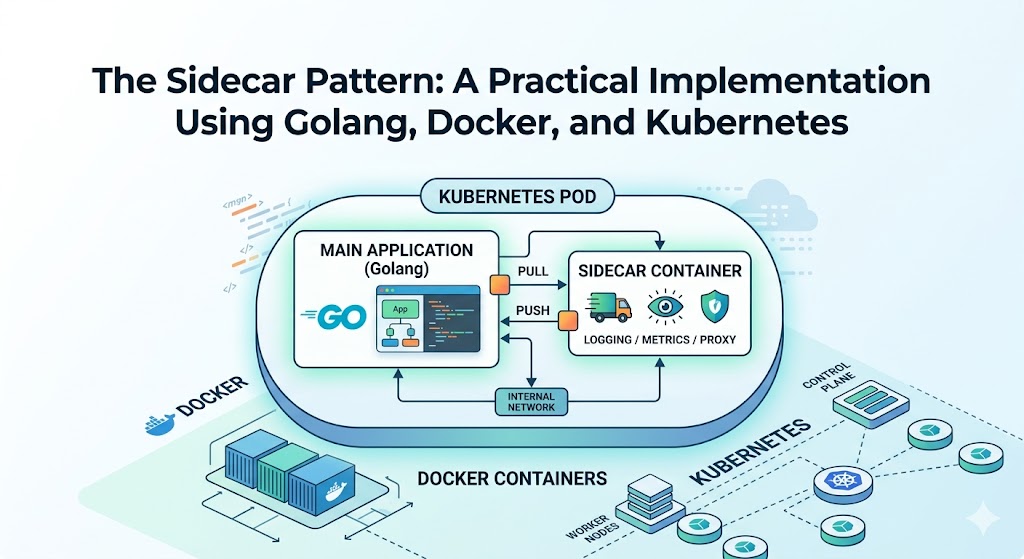
The Sidecar Pattern solves this by attaching a helper container to your main application container, running side by side, sharing the same lifecycle and resources, yet remaining independently developed and deployed.
In this article, we will cover what the sidecar pattern is, when to use it, and then build a complete, working example: a Go application paired with a Go-based sidecar that handles log shipping and health aggregation. We will containerize both with Docker and deploy them together as a single Pod on Kubernetes.
What Is the Sidecar Pattern?
The Sidecar Pattern is a structural design pattern where a secondary container (the sidecar) is deployed alongside a primary application container to extend or enhance its functionality without modifying the application itself.
The name is borrowed from the sidecar attached to a motorcycle. The motorcycle (your main app) does the core driving. The sidecar rides along, sharing the same journey, but carries its own passenger or cargo (supporting features).
Key Characteristics
- Co-located: The sidecar runs in the same logical unit as the main app. In Kubernetes, that unit is the Pod.
- Shared lifecycle: Both containers start, run, and stop together.
- Shared resources: They can share network namespace (
localhost), volumes, and IPC. - Loosely coupled at the code level: The main app and sidecar are separate processes and codebases. Neither needs to know the internal implementation of the other.
Sidecar vs. Library
| Aspect | Library (in-process) | Sidecar (out-of-process) |
|---|---|---|
| Language coupling | Tied to app language | Language agnostic |
| Deployment | Recompile app to update | Update sidecar independently |
| Resource isolation | Shares app process | Isolated process and limits |
| Failure blast radius | Crashes the app | Isolated, recoverable |
The biggest win: a single sidecar written once can serve apps written in Go, Java, Python, or Node.js without rewriting the logic for each language.
When Should You Use a Sidecar?
The sidecar pattern shines for cross-cutting concerns that are orthogonal to business logic. Common use cases include:
- Logging and log shipping: Collect, transform, and forward logs (think Fluent Bit).
- Monitoring and metrics: Scrape and expose metrics to Prometheus.
- Service mesh proxies: Envoy in Istio or Linkerd handles traffic routing, retries, and mTLS.
- Configuration synchronization: Watch a config source and refresh local files.
- Security: TLS termination, secret rotation, certificate management.
- Caching and data sync: Warm a local cache or sync state from a remote store.
When NOT to Use It
Sidecars are not free. Each one consumes CPU, memory, and adds operational complexity. Avoid the pattern when:
- The functionality is trivial and could be a simple library call.
- Latency between the app and sidecar is unacceptable for your workload.
- You are running on resource-constrained edge devices where the overhead matters.
Architecture of Our Example
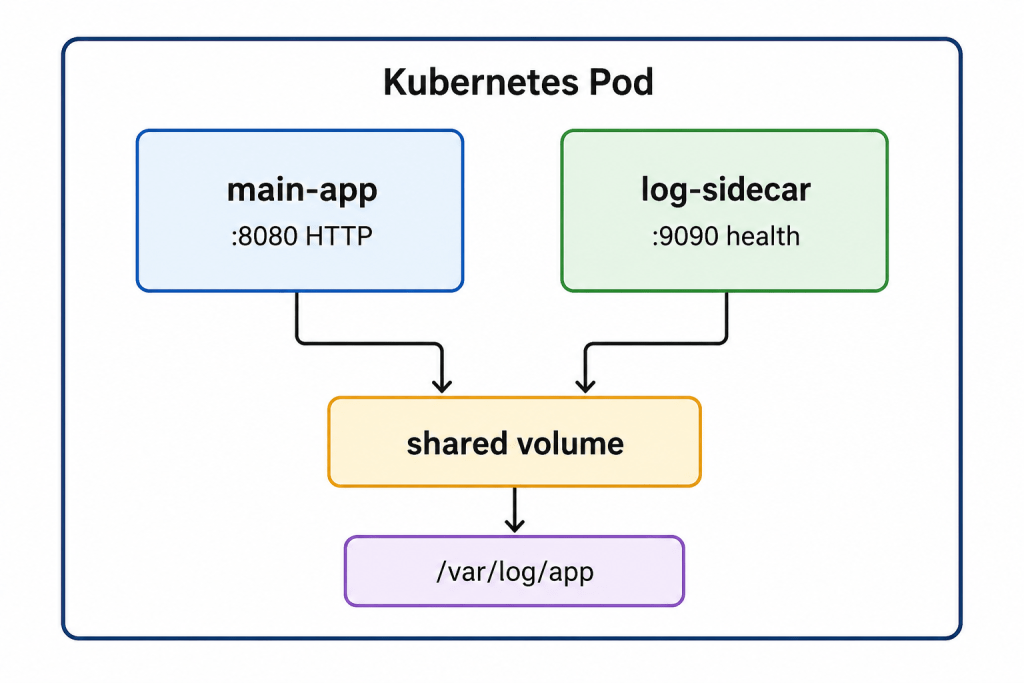
We will build two services:
main-app— A simple HTTP server in Go that serves traffic and writes structured logs to a shared file.log-sidecar— A Go sidecar that tails the shared log file, enriches each entry with metadata, and exposes an aggregated health endpoint.
Both run in a single Pod and communicate through a shared volume (for logs) and localhost (for health checks).
Step 1: Building the Main Application in Go
The main app serves HTTP requests and writes a JSON log line per request to a shared file.
// main-app/main.gopackage main
import (
"encoding/json"
"log"
"net/http"
"os"
"time"
)
type LogEntry struct {
Timestamp string `json:"timestamp"`
Method string `json:"method"`
Path string `json:"path"`
Status int `json:"status"`
}
const logPath = "/var/log/app/access.log"
func initLogFile() {
f, err := os.OpenFile(logPath, os.O_APPEND|os.O_CREATE|os.O_WRONLY, 0644)
if err != nil {
log.Fatalf("failed to init log file: %v", err)
}
f.Close()
}
func writeLog(entry LogEntry) {
f, err := os.OpenFile(logPath, os.O_APPEND|os.O_CREATE|os.O_WRONLY, 0644)
if err != nil {
log.Printf("failed to open log file: %v", err)
return
}
defer f.Close()
data, _ := json.Marshal(entry)
if _, err := f.Write(append(data, '\n')); err != nil {
log.Printf("failed to write log: %v", err)
}
}
func handler(w http.ResponseWriter, r *http.Request) {
w.WriteHeader(http.StatusOK)
w.Write([]byte("Hello from main-app\n"))
writeLog(LogEntry{
Timestamp: time.Now().UTC().Format(time.RFC3339),
Method: r.Method,
Path: r.URL.Path,
Status: http.StatusOK,
})
}
func healthz(w http.ResponseWriter, r *http.Request) {
w.WriteHeader(http.StatusOK)
w.Write([]byte("ok"))
}
func main() {
initLogFile()
http.HandleFunc("/", handler)
http.HandleFunc("/healthz", healthz)
log.Println("main-app listening on: 8080")
if err := http.ListenAndServe(":8080", nil); err != nil {
log.Fatalf("server failed: %v", err)
}
}
The app knows nothing about log shipping. It just writes to a file. That separation of concerns is the heart of the pattern.
Step 2: Building the Log Sidecar in Go
The sidecar tails the shared log file, enriches each line with the hostname and a processing timestamp, prints it to stdout (so Kubernetes log collectors can pick it up), and exposes a health endpoint.
// log-sidecar/main.gopackage main
import (
"bufio"
"encoding/json"
"log"
"net/http"
"os"
"sync/atomic"
"time"
)
const logPath = "/var/log/app/access.log"
var linesProcessed int64
type Enriched struct {
Raw json.RawMessage `json:"raw"`
Host string `json:"host"`
ProcessedAt string `json:"processed_at"`
}
func tailFile(path string) {
var f *os.File
var err error
// Wait for the file to be created by the main app.
for {
f, err = os.Open(path)
if err == nil {
break
}
log.Printf("waiting for log file at %s (main-app creates it on startup)", path)
time.Sleep(2 * time.Second)
}
log.Printf("tailing log file: %s", path)
defer f.Close()
host, _ := os.Hostname()
reader := bufio.NewReader(f)
for {
line, err := reader.ReadBytes('\n')
if err != nil {
// No new data yet; poll again shortly.
time.Sleep(500 * time.Millisecond)
continue
}
enriched := Enriched{
Raw: json.RawMessage(line),
Host: host,
ProcessedAt: time.Now().UTC().Format(time.RFC3339),
}
out, _ := json.Marshal(enriched)
log.Println(string(out))
atomic.AddInt64(&linesProcessed, 1)
}
}
func health(w http.ResponseWriter, r *http.Request) {
resp := map[string]interface{}{
"status": "healthy",
"lines_processed": atomic.LoadInt64(&linesProcessed),
}
w.Header().Set("Content-Type", "application/json")
json.NewEncoder(w).Encode(resp)
}
func main() {
go tailFile(logPath)
http.HandleFunc("/health", health)
log.Println("log-sidecar listening on :9090")
if err := http.ListenAndServe(":9090", nil); err != nil {
log.Fatalf("sidecar failed: %v", err)
}
}
This naive tailer uses polling for clarity. In production you would use fsnotify for event-driven file watching and handle log rotation, but the pattern remains identical.
Step 3: Containerizing with Docker
We use multi-stage builds to keep images small and secure. A static Go binary in a minimal base image dramatically reduces attack surface.
Dockerfile for the Main App
# main-app/Dockerfile
FROM golang:1.22-alpine AS build
WORKDIR /src
COPY go.mod ./
RUN go mod download
COPY . .
RUN CGO_ENABLED=0 GOOS=linux go build -o /bin/main-app .

FROM gcr.io/distroless/static-debian12
COPY --from=build /bin/main-app /bin/main-app
EXPOSE 8080
USER nonroot:nonroot
ENTRYPOINT ["/bin/main-app"]
Dockerfile for the Sidecar
# log-sidecar/Dockerfile
FROM golang:1.22-alpine AS build
WORKDIR /src
COPY go.mod ./
RUN go mod download
COPY . .
RUN CGO_ENABLED=0 GOOS=linux go build -o /bin/log-sidecar .

FROM gcr.io/distroless/static-debian12
COPY --from=build /bin/log-sidecar /bin/log-sidecar
EXPOSE 9090
USER nonroot:nonroot
ENTRYPOINT ["/bin/log-sidecar"]
Build and push both images:
docker build -t your-registry/main-app:1.0 ./main-app
docker build -t your-registry/log-sidecar:1.0 ./log-sidecar

docker push your-registry/main-app:1.0
docker push your-registry/log-sidecar:1.0
Note:
distroless/staticruns as anonrootuser, but it owns its own writable paths. Because both containers write to a sharedemptyDirvolume, we set the volume’s filesystem group in the Pod spec below so the non-root user can write to it.
Step 4: Deploying to Kubernetes
The crucial detail: both containers live in the same Pod and share an emptyDir volume mounted at /var/log/app.
# deployment.yamlapiVersion: apps/v1
kind: Deployment
metadata:
name: app-with-sidecar
labels:
app: app-with-sidecar
spec:
replicas: 2
selector:
matchLabels:
app: app-with-sidecar
template:
metadata:
labels:
app: app-with-sidecar
spec:
securityContext:
fsGroup: 65532
volumes:
- name: shared-logs
emptyDir: {}
containers:
- name: main-app
image: your-registry/main-app:1.0
imagePullPolicy: IfNotPresent
ports:
- containerPort: 8080
volumeMounts:
- name: shared-logs
mountPath: /var/log/app
resources:
requests:
cpu: "100m"
memory: "64Mi"
limits:
cpu: "250m"
memory: "128Mi"
livenessProbe:
httpGet:
path: /healthz
port: 8080
initialDelaySeconds: 5
periodSeconds: 10
- name: log-sidecar
image: your-registry/log-sidecar:1.1
imagePullPolicy: IfNotPresent
ports:
- containerPort: 9090
volumeMounts:
- name: shared-logs
mountPath: /var/log/app
resources:
requests:
cpu: "50m"
memory: "32Mi"
limits:
cpu: "100m"
memory: "64Mi"
livenessProbe:
httpGet:
path: /health
port: 9090
initialDelaySeconds: 5
periodSeconds: 10
Add a Service to expose the main app:
# service.yaml
apiVersion: v1
kind: Service
metadata:
  name: app-with-sidecar
spec:
  selector:
    app: app-with-sidecar
  ports:
    - name: http
      port: 80
      targetPort: 8080
  type: ClusterIP
Apply everything:
kubectl apply -f deployment.yaml
kubectl apply -f service.yaml
Verify It Works
# Generate some traffic
kubectl port-forward svc/app-with-sidecar 8080:80 &
curl http://localhost:8080/
curl http://localhost:8080/api/users

# Watch the sidecar enrich and emit the logs
kubectl logs deploy/app-with-sidecar -c log-sidecar
You should see enriched JSON entries appear, each wrapping the raw log line from the main app along with the host and processing timestamp.
Native Sidecar Containers (Kubernetes 1.28+)
A long-standing pain point: in a Deployment, sidecars do not have a guaranteed startup or shutdown order relative to the main container. A sidecar might terminate before the app finishes flushing data.
Kubernetes 1.28 introduced native sidecar containers, defined as initContainers with a restartPolicy: Always. These start before the main containers and shut down after them, giving you proper lifecycle ordering.
spec:
  initContainers:
    - name: log-sidecar
      image: your-registry/log-sidecar:1.0
      restartPolicy: Always       # this makes it a native sidecar
      volumeMounts:
        - name: shared-logs
          mountPath: /var/log/app
  containers:
    - name: main-app
      image: your-registry/main-app:1.0
      # ...
If you are on a recent cluster, prefer native sidecars for logging, proxies, and anything that must outlive the main container during graceful shutdown.
Production Best Practices
- Set resource requests and limits on the sidecar. An unbounded sidecar can starve your main app or trigger Pod eviction.
- Define health probes for both containers so Kubernetes can detect and restart a failed sidecar independently.
- Handle graceful shutdown with SIGTERM handlers so the sidecar drains and flushes before exit. Use native sidecars to guarantee it runs until the app is done.
- Keep images minimal with distroless or scratch bases to reduce CVEs and image size.
- Run as non-root and set a read-only root filesystem where possible.
- Version sidecars independently and roll them out gradually. The decoupling is the whole point.
- Watch the overhead. Multiply sidecar resource usage by your replica count. Across thousands of Pods, a 64Mi sidecar adds up fast.
Common Pitfalls
- Volume permission errors: Non-root containers cannot write to a shared volume without the correct
fsGroup. This is the most common failure in real deployments. - Assuming startup order in plain Deployments: Without native sidecars, do not assume the sidecar is ready when the main app boots. Add readiness checks or retry logic (our tailer waits for the file to exist).
- Log rotation gaps: A naive file tailer loses data when the file rotates. Use a battle-tested collector like Fluent Bit for real workloads.
- Tight localhost coupling: Hardcoding ports couples containers. Prefer configuration via environment variables.
Conclusion
The Sidecar Pattern is one of the most powerful tools in the cloud-native toolbox. By moving cross-cutting concerns into a co-located helper container, you keep your main application focused on business logic while gaining language-agnostic, independently deployable infrastructure capabilities.
In this guide we built a complete example from scratch: a Go application and a Go sidecar that share a volume, packaged them as lean Docker images, and deployed them as a single Kubernetes Pod, including the modern native sidecar approach. The same blueprint scales up to real-world sidecars for logging, metrics, security, and service mesh proxies.
Start small, measure the resource overhead, adopt native sidecars where available, and let your services stay clean.
Frequently Asked Questions
What is the difference between a sidecar and an init container?
An init container runs to completion before the main containers start and does not run alongside them. A traditional sidecar runs concurrently with the main container for the entire Pod lifetime. Native sidecars (init containers with restartPolicy: Always) blend both: they start first and keep running alongside the app.
Can a sidecar be written in a different language than the main app?
Yes, and this is one of its biggest advantages. The sidecar communicates over localhost, shared volumes, or IPC, so the main app can be in Java while the sidecar is in Go.
Does the sidecar pattern add latency?
There is some overhead since communication happens between processes rather than in-process. Over localhost it is minimal, but for extremely latency-sensitive paths, benchmark before committing.
How many sidecars can a single Pod have?
There is no hard limit beyond resource constraints, but keep it small. Each sidecar multiplies resource consumption across every replica.
Is a service mesh just a sidecar pattern?
Service meshes like Istio and Linkerd are a large-scale application of the sidecar pattern, injecting a proxy (such as Envoy) into every Pod to handle traffic management, observability, and security.