
As distributed systems grow, the networking logic surrounding your services tends to grow with them. Retries, TLS termination, service discovery, rate limiting, and observability all start creeping into your application code. Before long, your business logic is buried under connection-handling boilerplate.
The Ambassador pattern is a clean answer to this problem. It pulls that networking concern out of your application and into a dedicated helper process that sits alongside it. Your app talks to localhost, and the ambassador handles the messy realities of the network.
In this article you’ll learn what the Ambassador pattern is, when to reach for it, and how it relates to the broader sidecar family of patterns. Then we’ll build a working ambassador in Go, package it with Docker, and deploy it as a sidecar in Kubernetes.
What Is the Ambassador Pattern?
The Ambassador pattern is a structural design pattern for distributed systems. It places a proxy process next to your main application that brokers all outbound (or sometimes inbound) network communication on the application’s behalf.
Think of a real-world ambassador. A head of state doesn’t personally negotiate every detail with a foreign government. They send an ambassador who speaks the language, understands the local customs, and handles the diplomacy. The head of state simply states intent; the ambassador deals with the complexity.
In software terms:
- Your application focuses purely on business logic.
- The ambassador handles retries, timeouts, circuit breaking, TLS, routing, and metrics.
- The application connects to the ambassador over
localhost, treating the network as if it were trivially simple.
This is a specialization of the sidecar pattern, where a secondary container runs in the same execution context as the primary one and extends its behavior without modifying it.
Ambassador vs. Sidecar vs. Adapter
These three are often confused, so let’s draw clear lines:
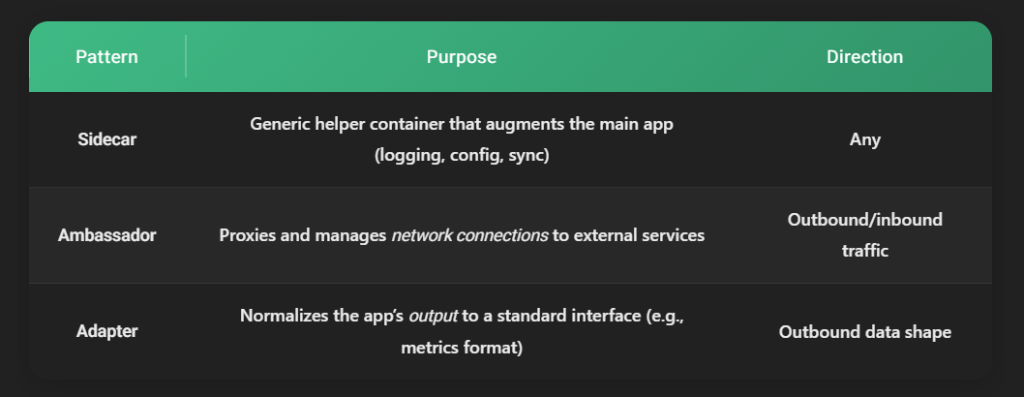
The ambassador is essentially a network-focused sidecar.
Why Use the Ambassador Pattern?
Pulling networking concerns into an ambassador buys you several concrete advantages.
Separation of concerns. Your application code stops caring about retry strategies or which replica of a database to connect to. It just connects to 127.0.0.1:6379 and trusts the ambassador.
Language independence. A retry-and-circuit-breaker library written in Go can sit in front of a Python app, a Java app, or a legacy binary you can’t easily modify. The ambassador speaks a network protocol, not a language API.
Centralized, consistent policy. Timeouts, TLS, and rate limits are configured once in the ambassador rather than re-implemented in every service and every language.
Easier testing. You can point your application at a local ambassador that routes to a test double, without touching application code.
Observability for free. Because all traffic flows through the ambassador, it’s the natural place to emit connection metrics, latency histograms, and error rates.
When not to use it
The pattern adds a network hop and an extra process per instance. For a small monolith or a latency-critical hot path where every microsecond counts, the indirection may not be worth it. Use it where networking complexity is real and recurring.
How the Ambassador Pattern Works
Here’s the conceptual flow in a Kubernetes Pod:
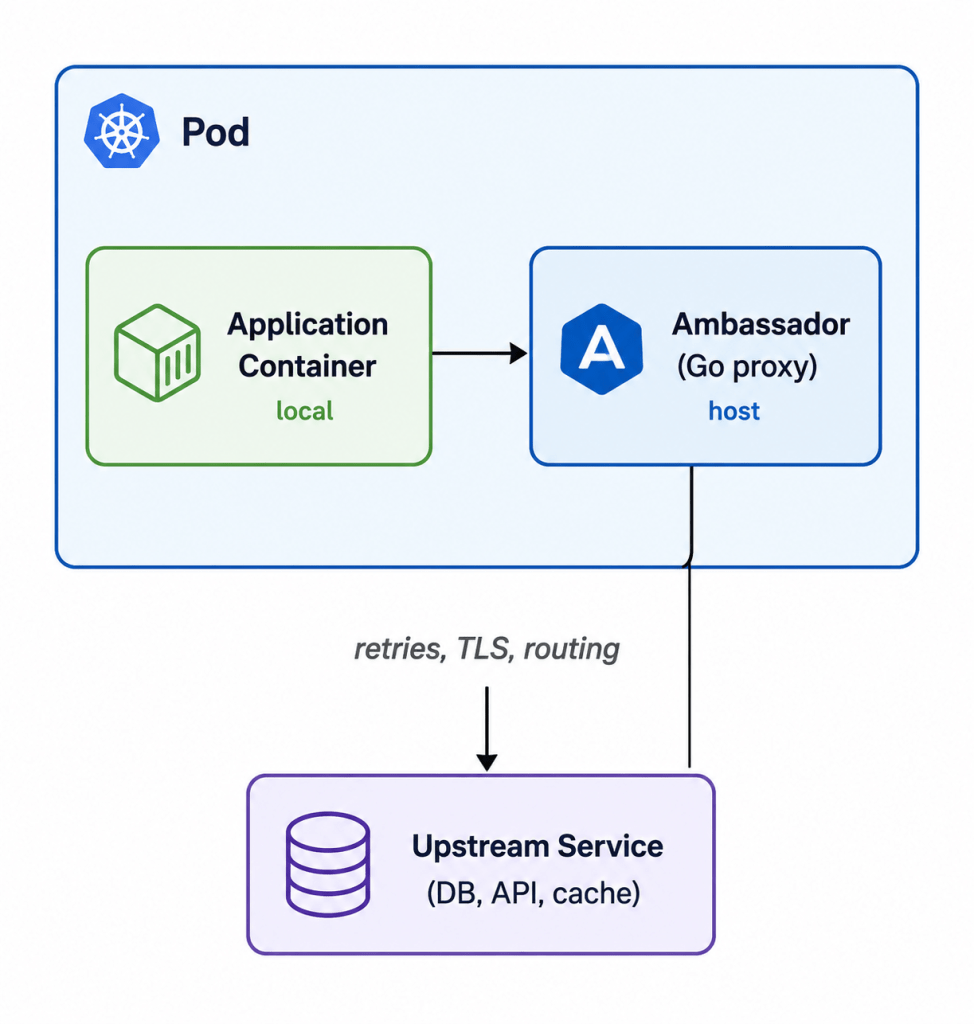
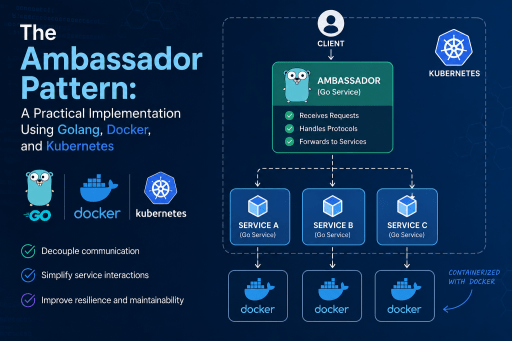
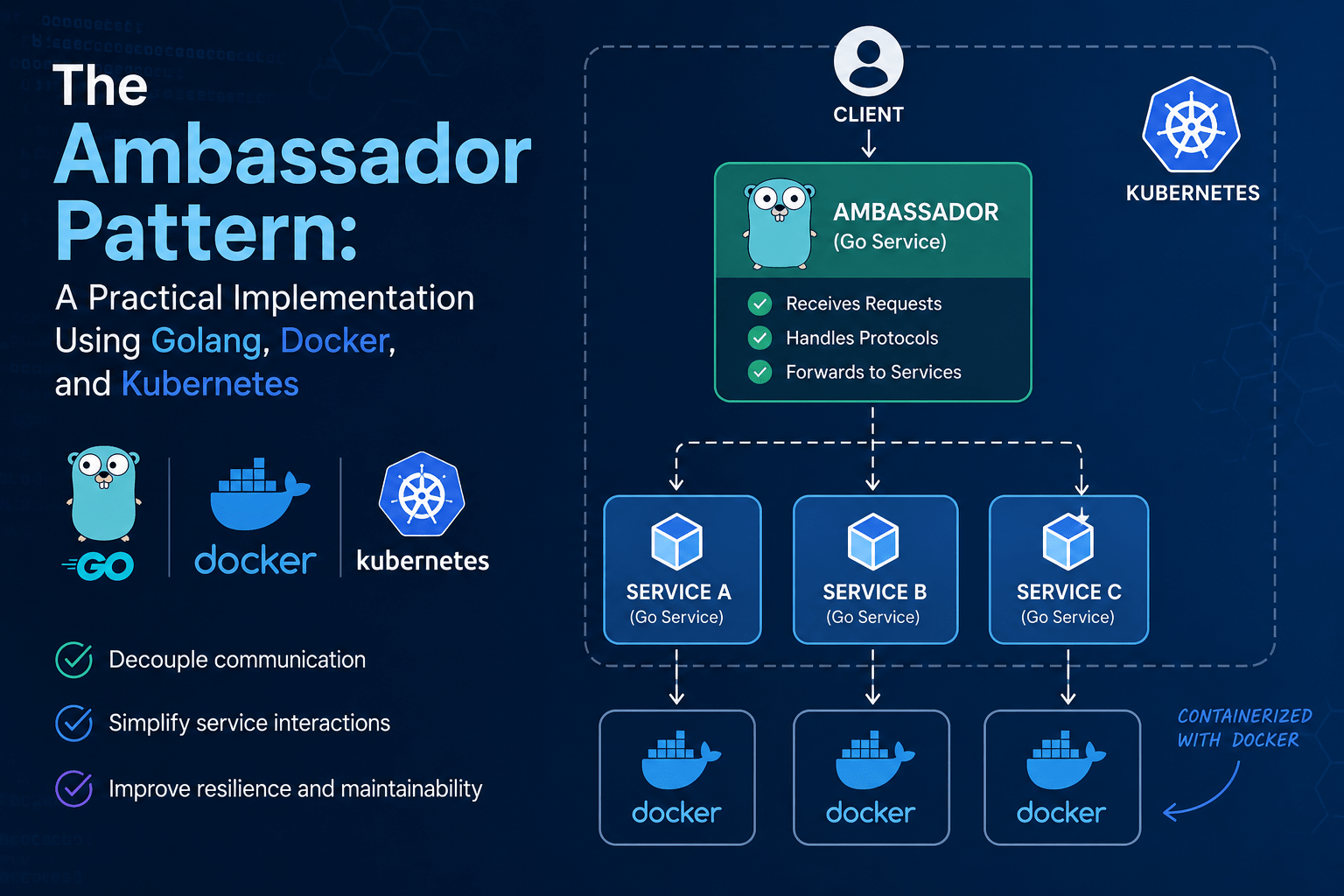
The application connects to the ambassador as though it were the real upstream. The ambassador resolves the actual destination, applies policy, forwards the request, and handles failures transparently.
Practical Implementation in Go
Let’s build a real ambassador. Our example will be a TCP proxy with retries, timeouts, and basic metrics that an application uses to reach an upstream service. Go is an excellent fit here thanks to its first-class concurrency and tiny static binaries.
Project structure
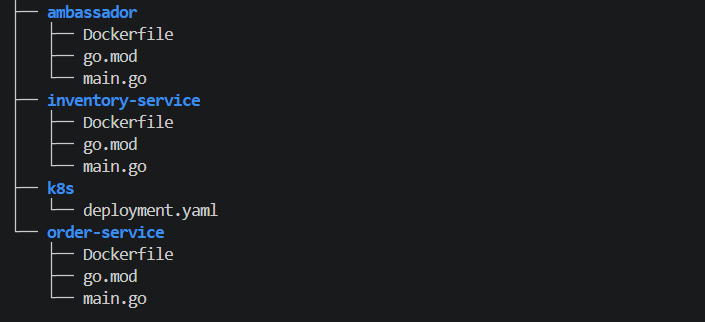
1. Order Service (order-service/main.go)
A minimal HTTP service that calls the inventory via the ambassador.
package main
import (
	"fmt"
	"io"
	"log"
	"net/http"
)
func main() {
	http.HandleFunc("/order", func(w http.ResponseWriter, r *http.Request) {
		// Calls ambassador on localhost, not the real service directly
		resp, err := http.Get("http://localhost:8080/inventory")
		if err != nil {
			http.Error(w, "upstream error: "+err.Error(), http.StatusBadGateway)
			return
		}
		defer resp.Body.Close()
		body, _ := io.ReadAll(resp.Body)
		fmt.Fprintf(w, "Order received. Inventory says: %s", body)
	})
	log.Println("Order service listening on :3000")
	log.Fatal(http.ListenAndServe(":3000", nil))
}
2. Ambassador Proxy (ambassador/main.go)
Listens on :8080, forwards requests to the real upstream, adds retry logic.
package main
import (
	"io"
	"log"
	"net/http"
	"net/http/httputil"
	"net/url"
	"os"
	"time"
)
var upstream = func() string {
	if u := os.Getenv("UPSTREAM_URL"); u != "" {
		return u
	}
	return "http://inventory-service:9000"
}()
func main() {
	target, err := url.Parse(upstream)
	if err != nil {
		log.Fatal(err)
	}
	proxy := httputil.NewSingleHostReverseProxy(target)
	proxy.Transport = &retryTransport{base: http.DefaultTransport}
	log.Printf("Ambassador proxying to %s", upstream)
	log.Fatal(http.ListenAndServe(":8080", proxy))
}
type retryTransport struct {
	base http.RoundTripper
}
func (t *retryTransport) RoundTrip(req *http.Request) (*http.Response, error) {
	var (
		resp *http.Response
		err  error
	)
	for attempt := 0; attempt < 3; attempt++ {
		resp, err = t.base.RoundTrip(req)
		if err == nil {
			return resp, nil
		}
		log.Printf("attempt %d failed: %v", attempt+1, err)
		time.Sleep(time.Duration(attempt+1) * 200 * time.Millisecond)
	}
	return nil, err
}
3. Inventory Service (inventory-service/main.go)
A stub service to make the example fully runnable.
package main
import (
	"fmt"
	"log"
	"net/http"
)
func main() {
	http.HandleFunc("/inventory", func(w http.ResponseWriter, r *http.Request) {
		fmt.Fprintln(w, `{"item":"widget","stock":42}`)
	})
	log.Println("Inventory service listening on :9000")
	log.Fatal(http.ListenAndServe(":9000", nil))
}
4. Dockerfiles
Order Service (order-service/Dockerfile):
FROM golang:1.22-alpine AS build
WORKDIR /app
COPY . .
RUN go build -o order-service .

FROM gcr.io/distroless/static:nonroot
COPY --from=build /app/order-service /order-service
ENTRYPOINT ["/order-service"]
Ambassador (ambassador/Dockerfile):
FROM golang:1.22-alpine AS build
WORKDIR /app
COPY . .
RUN go build -o ambassador .

FROM gcr.io/distroless/static:nonroot
COPY --from=build /app/ambassador /ambassador
ENTRYPOINT ["/ambassador"]
Inventory Service (inventory-service/Dockerfile):
FROM golang:1.22-alpine AS build
WORKDIR /app
COPY . .
RUN go build -o inventory-service .

FROM gcr.io/distroless/static:nonroot
COPY --from=build /app/inventory-service /inventory-service
ENTRYPOINT ["/inventory-service"]
5. Kubernetes Deployment (k8s/deployment.yaml)
apiVersion: apps/v1
kind: Deployment
metadata:
  name: order-service
spec:
  replicas: 2
  selector:
    matchLabels:
      app: order-service
  template:
    metadata:
      labels:
        app: order-service
    spec:
      containers:
        # Main application
        - name: order-service
          image: your-registry/order-service:latest
          ports:
            - containerPort: 3000
          resources:
            limits:
              cpu: "200m"
              memory: "128Mi"

        # Ambassador sidecar
        - name: ambassador
          image: your-registry/ambassador:latest
          env:
            - name: UPSTREAM_URL
              value: "http://inventory-service:9000"
          ports:
            - containerPort: 8080
          resources:
            limits:
              cpu: "100m"
              memory: "64Mi"
          readinessProbe:
            httpGet:
              path: /inventory
              port: 8080
            initialDelaySeconds: 3
            periodSeconds: 5
---
apiVersion: v1
kind: Service
metadata:
  name: order-service
spec:
  selector:
    app: order-service
  ports:
    - port: 80
      targetPort: 3000
---
# The real upstream — deployed separately
apiVersion: apps/v1
kind: Deployment
metadata:
  name: inventory-service
spec:
  replicas: 1
  selector:
    matchLabels:
      app: inventory-service
  template:
    metadata:
      labels:
        app: inventory-service
    spec:
      containers:
        - name: inventory-service
          image: your-registry/inventory-service:latest
          ports:
            - containerPort: 9000
---
apiVersion: v1
kind: Service
metadata:
  name: inventory-service
spec:
  selector:
    app: inventory-service
  ports:
    - port: 9000
      targetPort: 9000
6. Building Docker Images
To be able to test the implementation using kuberenetes, first we need to build the docker images, so in the root of the project, run these commands:
docker build -t your-registry/go-ambassador-pattern-order-service:latest ./order-service
docker build -t your-registry/go-ambassador-pattern-ambassador:latest ./ambassador
docker build -t your-registry/go-ambassador-pattern-inventory-service:latest ./inventory-service
Then we need to push these images to the docker registry:
docker push your-registry/go-ambassador-pattern-order-service:latest
docker push your-registry/go-ambassador-pattern-ambassador:latest
docker push your-registry/go-ambassador-pattern-inventory-service:latest
7. Kubernetes Requirements
In order to be able to test this project, you need to have Kubernetes installed on your system:
# Confirm cluster access
kubectl cluster-info
kubectl get nodes
8. Deploying to K8s:
To deploy the project on kubernetes, in the root of the project, run this command:
kubectl apply -f k8s/deployment.yaml9. Verifying It’s running:
# Check pods
kubectl get pods -l app=order-service
kubectl get pods -l app=inventory-service
# Both should show 2/2 READY for order-service (app + ambassador sidecar)
# and 1/1 for inventory-service
10. Test from Inside the Cluster:
The cleanest way — spin up a temporary pod and curl from inside:
kubectl run test-client \
  --image=curlimages/curl:latest \
  --restart=Never \
  --rm -it \
  -- curl http://order-service/order
Expected response:
Order received. Inventory says: {“item”:“widget”,“stock”:42}
11. Test Each Layer Independently
Hit the ambassador directly (bypassing the order service):
kubectl run test-client \
  --image=curlimages/curl:latest \
  --restart=Never \
  --rm -it \
  -- curl http://order-service:8080/inventory
Hit the inventory service directly:
kubectl run test-client \
  --image=curlimages/curl:latest \
  --restart=Never \
  --rm -it \
  -- curl http://inventory-service:9000/inventory
This confirms each layer works in isolation before testing the full chain.
12. Check Logs
# Get pod name
kubectl get pods -l app=order-service

# Logs from the order service container
kubectl logs <pod-name> -c order-service

# Logs from the ambassador sidecar
kubectl logs <pod-name> -c ambassador

# Follow live
kubectl logs <pod-name> -c ambassador -f
13. Test Retry Behavior
Break the inventory service to confirm the ambassador retries:
# Scale inventory to 0
kubectl scale deployment inventory-service --replicas=0

# Hit the order service — you should see retry logs in the ambassador
kubectl run test-client \
  --image=curlimages/curl:latest \
  --restart=Never \
  --rm -it \
  -- curl http://order-service/order

# Watch ambassador logs in another terminal
kubectl logs -l app=order-service -c ambassador -f

# Restore
kubectl scale deployment inventory-service --replicas=1
Ambassador logs should show:
attempt 1 failed: dial tcp: connection refused
attempt 2 failed: dial tcp: connection refused
attempt 3 failed: dial tcp: connection refused
14. Port-Forward for Local Browser Access (optional)
kubectl port-forward svc/order-service 8080:80
curl http://localhost:8080/order
15. Cleanup
kubectl delete -f k8s/deployment.yaml
kubectl delete pod test-client --ignore-not-found
Best Practices
A few hard-won guidelines for running ambassadors in production.
Keep resource limits tight. An ambassador should be lightweight. Set modest CPU and memory limits so it never competes with the main app for resources.
Make it observable. Expose Prometheus metrics and structured logs. The whole point is centralized network insight, so use it. Wire the Metrics.Snapshot() from our example to a /metrics HTTP endpoint.
Add health checks. Give the ambassador readiness and liveness probes so Kubernetes knows when it can accept traffic and when to restart it.
Handle graceful shutdown. Listen for SIGTERM and drain in-flight connections before exiting, especially important during rolling updates.
Secure the runtime. Use distroless or scratch images, run as non-root, and set readOnlyRootFilesystem: true as shown above.
Version the ambassador independently. Because it’s decoupled from the app, you can roll out networking improvements (better retry logic, new TLS settings) without rebuilding application images.
Don’t reinvent service meshes. If you need ambassador behavior across dozens of services, evaluate a service mesh like Istio or Linkerd, which automate sidecar injection. A hand-rolled ambassador is ideal for targeted needs or when a full mesh is overkill.
Frequently Asked Questions
Is the Ambassador pattern the same as a service mesh?
No, but they’re related. A service mesh (Istio, Linkerd) automates the injection and management of ambassador-style sidecars across an entire cluster. A standalone ambassador is a lighter, more targeted solution you control directly.
Does the extra hop hurt performance?
There’s a small added latency from the local proxy, but since communication happens over the loopback interface within the same Pod, it’s typically negligible compared to the network call to the upstream itself.
Can one ambassador serve multiple applications?
The classic pattern pairs one ambassador per application instance so they share a lifecycle and network namespace. A shared ambassador is possible but reintroduces the coupling and single-point-of-failure concerns the pattern aims to avoid.
What languages work with this approach?
Any. The application communicates with the ambassador over a network protocol, so a Go ambassador can front a Python, Java, Node.js, or even a closed-source legacy app without modification.
Conclusion
The Ambassador pattern is a pragmatic way to keep networking complexity out of your application code. By delegating retries, routing, TLS, and observability to a dedicated proxy process, you get cleaner services, consistent policy, and language-agnostic reuse.
With Go you get a small, fast, statically-linked binary. With Docker you package it into a minimal, secure image. With Kubernetes you deploy it as a sidecar that shares a network namespace with your app, making localhost the only address your application ever needs to know.
Start small: wrap a single noisy dependency, like a cache or a flaky third-party API, in an ambassador and measure the difference in your application’s error handling. From there, the pattern scales naturally with your architecture.